> ## Documentation Index
> Fetch the complete documentation index at: https://docs.transcribetube.com/llms.txt
> Use this file to discover all available pages before exploring further.
# Transcription Text Editor
> Learn how to use the Transcription Text Editor to review, edit, and refine your transcriptions. This tool is designed to make the transcription process smoother and more accurate.
The **Transcription Text Editor** provides a user-friendly interface to review, edit, and refine your transcriptions. Each feature in the editor is designed to make the transcription process smoother and more accurate. Here’s a breakdown of each numbered feature:
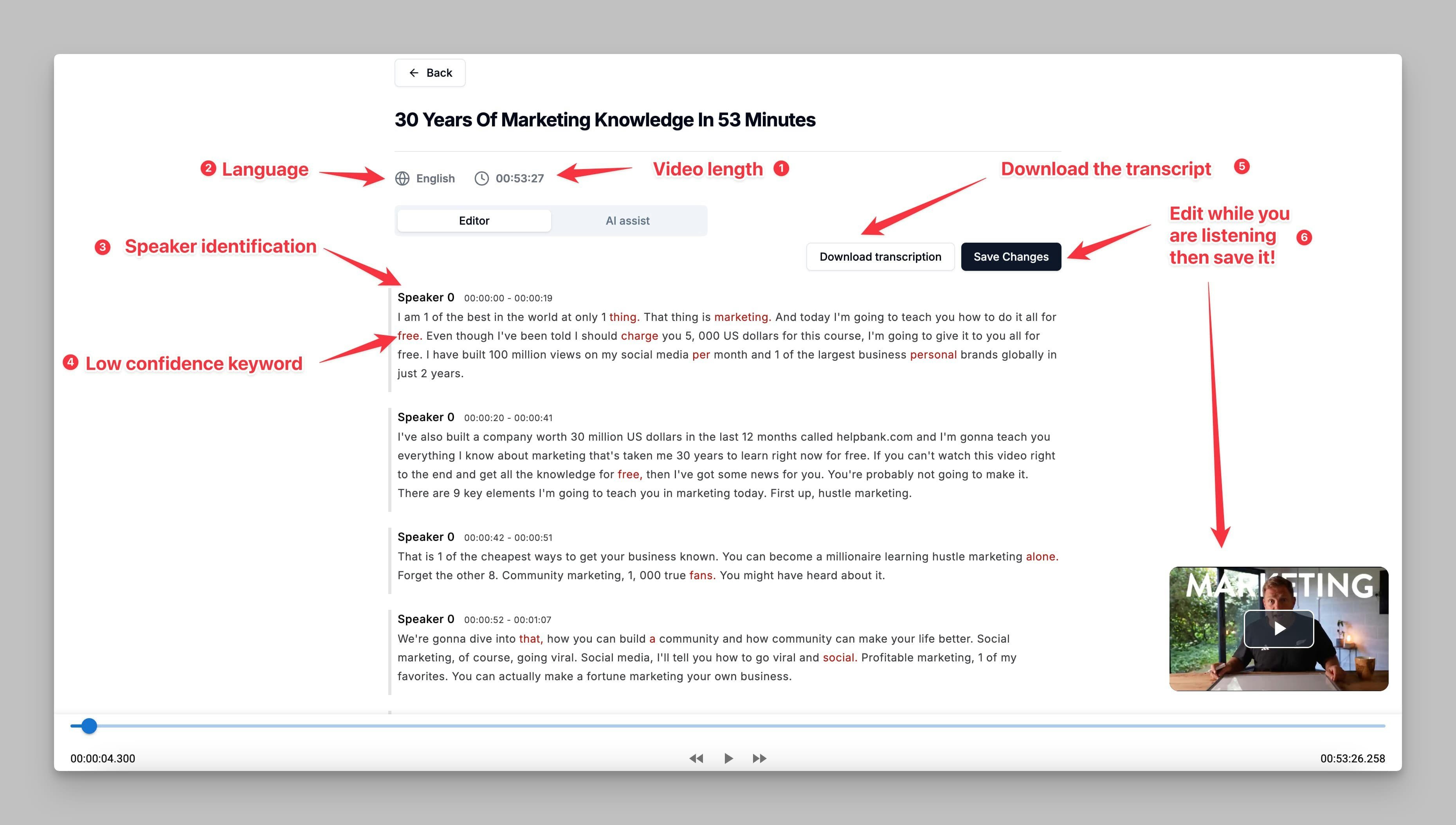 ## 1. Video Length
* Displays the total length of the video being transcribed.
* This information helps you understand the duration of the content and track your progress as you edit the transcription.
## 2. Language
* Displays the language of the transcription. This information is useful if you are working with multiple languages and need confirmation of the transcription language.
## 3. Speaker Identification
* The editor uses speaker labels (e.g., "Speaker 0") to distinguish different speakers in the transcription.
* This feature helps organize the text by identifying changes in speakers, making the dialogue clearer and easier to follow.
## 4. Low Confidence Keywords
* Certain words or phrases may be highlighted as **low-confidence keywords**. These words are marked when the transcription software is uncertain of their accuracy.
* You can review these keywords and correct them as needed to ensure a precise transcription.
## 5. Download Transcription
* Once you have reviewed and edited the transcription, you can click on **Download Transcription**.
* The download options include `.txt` (text document) and `.srt` (subtitle) formats, allowing flexibility based on your needs.
## 6. Edit and Save the Transcription while Listening to the Audio
* The editor allows you to make changes to the transcription text directly while listening to the audio.
* Once edits are complete, click **Save Changes** to preserve your modifications.
## 1. Video Length
* Displays the total length of the video being transcribed.
* This information helps you understand the duration of the content and track your progress as you edit the transcription.
## 2. Language
* Displays the language of the transcription. This information is useful if you are working with multiple languages and need confirmation of the transcription language.
## 3. Speaker Identification
* The editor uses speaker labels (e.g., "Speaker 0") to distinguish different speakers in the transcription.
* This feature helps organize the text by identifying changes in speakers, making the dialogue clearer and easier to follow.
## 4. Low Confidence Keywords
* Certain words or phrases may be highlighted as **low-confidence keywords**. These words are marked when the transcription software is uncertain of their accuracy.
* You can review these keywords and correct them as needed to ensure a precise transcription.
## 5. Download Transcription
* Once you have reviewed and edited the transcription, you can click on **Download Transcription**.
* The download options include `.txt` (text document) and `.srt` (subtitle) formats, allowing flexibility based on your needs.
## 6. Edit and Save the Transcription while Listening to the Audio
* The editor allows you to make changes to the transcription text directly while listening to the audio.
* Once edits are complete, click **Save Changes** to preserve your modifications.